Play Solitaire Online for Free
TheSolitaire.com gives you a smooth full-screen experience with simple controls, undo, hints, and built-in radio. Klondike Solitaire, Spider Solitaire, FreeCell, and 100+ other solitaire and card games run right in your browser — no download or registration required.



- TheJigsawPuzzles — Online jigsaw puzzles
- TheMahjong — Mahjong solitaire and connect games
- TheSudoku — Sudoku puzzles and strategies
How to Play Solitaire (Turn 1) — Quick Guide
Goal
Sort all cards into four foundation piles by suit in ascending order from A to K. For example, a 9 can be placed on an 8.
Tableau Columns
Arrange cards in the 7 columns in descending order, alternating colors. For example, a J can be placed on a Q or Q.
Moving Cards
Move cards individually or in pre-sorted groups that follow the rules.
Empty Columns
Only a K can start a new column.
Stockpile and Waste Pile
Click the stockpile to flip cards to the waste pile one by one.
The top waste card is playable.

What is Solitaire?
Solitaire is a classic single-player card game. As early as the 1800s, long before computers, people from all walks of life played it to pass the time on long journeys and quiet evenings. The mix of simple rules, strategy and luck kept Solitaire popular for more than a century. It became a favorite in casinos and private parlors, and decades later it found a new home on computer screens with the rise of digital Solitaire in the 1990s.
The Windows version of Solitaire really boosted the game’s popularity. People were not just killing time. They were learning how to use a computer mouse as they clicked and dragged cards across the screen. For many new PC users, Solitaire was a simple training tool on their road to everyday computer use.
Today there are hundreds of different versions of Solitaire — played with real cards and as online games — but the idea stays the same. You move cards into ordered piles, relying on logic and a bit of luck. The game is also known as Klondike.
Solitaire Rules — Step-by-Step
Solitaire (Turn 1) uses one standard 52-card deck.
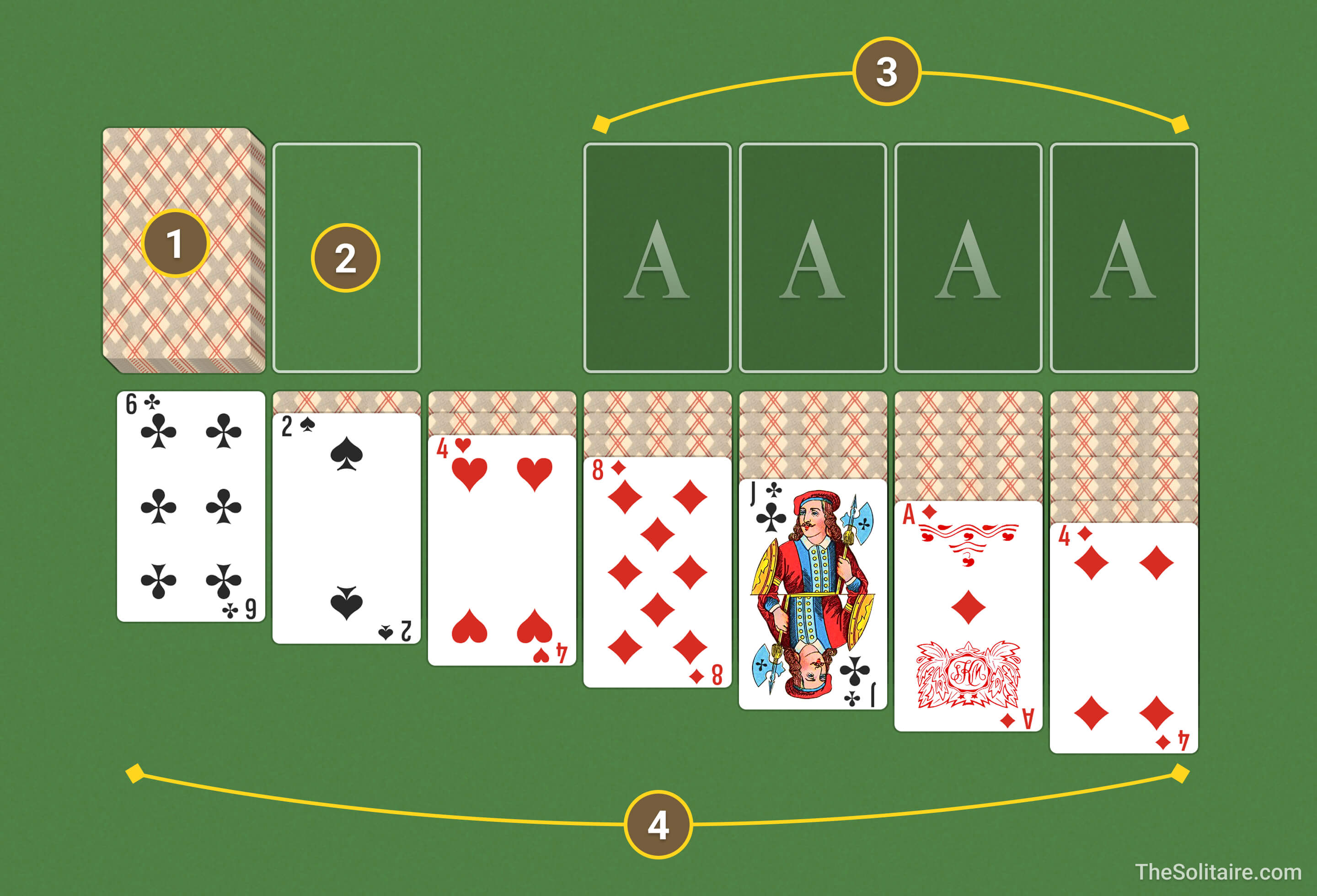
Types of Solitaire Piles
- Contains 24 cards.
- Click on the stockpile to flip the top card one at a time to the waste pile.
- Holds cards flipped from the stockpile.
- Only the top card is available for play.
- Goal: Build up all cards into 4 foundation piles by suits.
- Start with an A, then add cards sequentially: 2, 3, ..., K.
- 7 columns of cards: 1st column — 1 card. 2nd column — 2 cards, …, 7th column — 7 cards.
- The topmost card of each column is face up. All other cards are face down.
- Build down in descending order, alternating colors. For example: Q, J, 10.
How to Move Cards in Solitaire
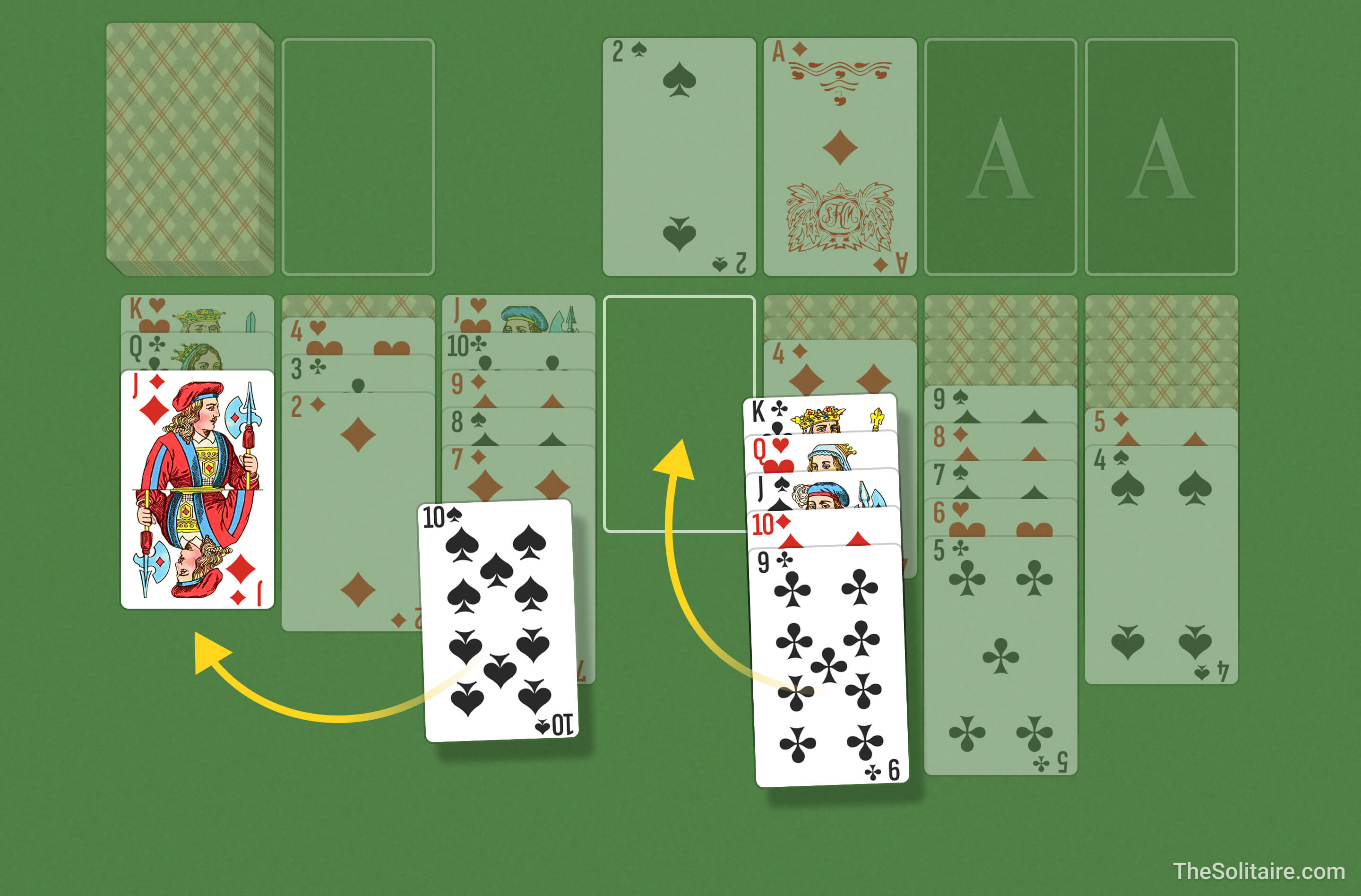
- Cards can only be placed in descending order (J, 10, 9, etc.).
- Alternate suit colors. Example: A J can be placed on a Q or Q.
- You can move individual cards or pre-sorted groups that follow the rules.
- Only a K can start a new column.
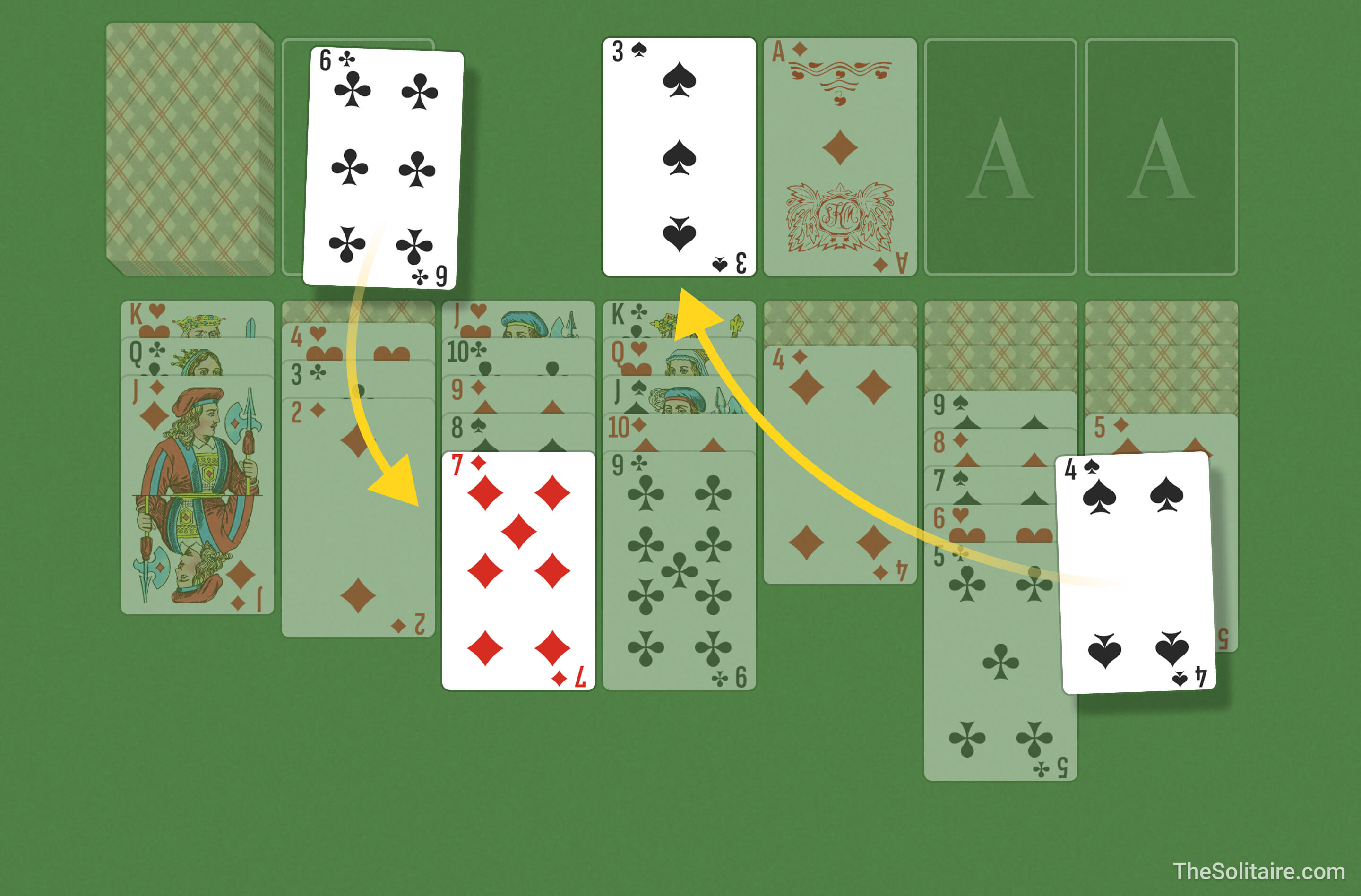
- Start with an A and build up in ascending order within the same suit. Example: A, 2, 3.
- You can move a card from the foundation back to the tableau if needed.
- Click the stockpile to flip cards to the waste pile one at a time.
- The top card of the waste pile can be moved to the tableau or foundations.
- Customize the number of passes through the stockpile and difficulty:
- 1 pass: challenging;
- 3 passes: classic;
- unlimited passes: relaxed play;
Solitaire Keyboard Shortcuts (Hotkeys)
 Navigate
 Take/Place Card
 Undo
Undo
 Use Deck
 Hint
Hint
 Pause Game

Solitaire (Turn 1) Strategies — Tips & Tricks
A few insider secrets from seasoned Solitaire players to help you win more often.
- Aces and Deuces. As soon as you spot an A or a 2, move it to the foundations. It's a no-brainer move — these cards are useless in the tableau, so clear them out right away!
- Focus on revealing cards. Prioritize columns with the most hidden cards because clearing them unlocks new cards and creates more room for strategic moves.
- Think ahead. Don’t rush to move every card to the foundations. Sometimes, it’s better to hold cards in the tableau to build a longer sequence. This gives you more flexibility for future moves.
- Kings. An empty column is extremely valuable, but don’t clear it unless you’ve got a K ready to fill it. No King? No clear. Otherwise, that column is just going to sit there, gathering dust.
- Handy tools. The
 Hint and
  Undo buttons are your best friends. Hint highlights moves you might have missed. Undo lets you reverse missteps with a single click.
Difference between Turn 1 and Turn 3 in Solitaire
With Turn 1 you draw one card from the stockpile. With Turn 3 you draw three cards, but only the top card can be played. Turn 1 is easier. Turn 3 is harder and more strategic. If you want more of a challenge, try Triple Solitaire.