FreeCell Solitaire
FreeCell Solitaire is a classic for players who like to think a few moves ahead. The rules are simple, and smart planning makes each deal rewarding to solve — great for a short break or a longer, satisfying session. Play free in your browser with Hints, Undo, and full-screen mode on desktop or mobile.



- TheJigsawPuzzles — Online jigsaw puzzles
- TheMahjong — Mahjong solitaire and connect games
- TheSudoku — Sudoku puzzles and strategies
How to Play FreeCell — Quick Guide
Goal
Build up each home pile by suit, from A to K (A, 2, 3, …).
Moving Cards
You can organise the columns by moving cards in descending order and alternating colors (like 5 on 6).
You can move a whole group of cards if they’re in sequence.
Max cards in a group = number of empty free cells + 1. If no cells are free, you can only move one card at a time.
Free cells
Each free cell can hold one card. Use them to free up space and help with moves.
Empty Columns
You can start an empty column with any card.

What is FreeCell?
FreeCell is a classic solitaire card game that is more skill-based than many other solitaire variants. Winning usually depends on planning and decision-making, not just luck, which makes it a satisfying puzzle-style game for a wide range of players.
FreeCell first became widely known through computer versions. The earliest computerized version is credited to Paul Alfille, who implemented it on the PLATO system in 1978, long before the game reached most home PCs. Later, Jim Horne created a DOS version and then brought FreeCell to Windows, where it first appeared in Microsoft Entertainment Pack Volume 2.
FreeCell games are numbered, so the same game number always gives you the same card layout. That means you can replay a favorite game, send the number to a friend, or try to solve the same challenge together. On TheSolitaire.com, there are 999,999 numbered FreeCell games, and each one matches the card layout used in Microsoft FreeCell for the same number. The first 32,000 games are the classic Microsoft FreeCell set from Windows 98. Almost all of them can be solved, except for the famous game #11982. To learn how to play FreeCell Solitaire, follow the step-by-step guide below.
FreeCell Rules — Step-by-Step
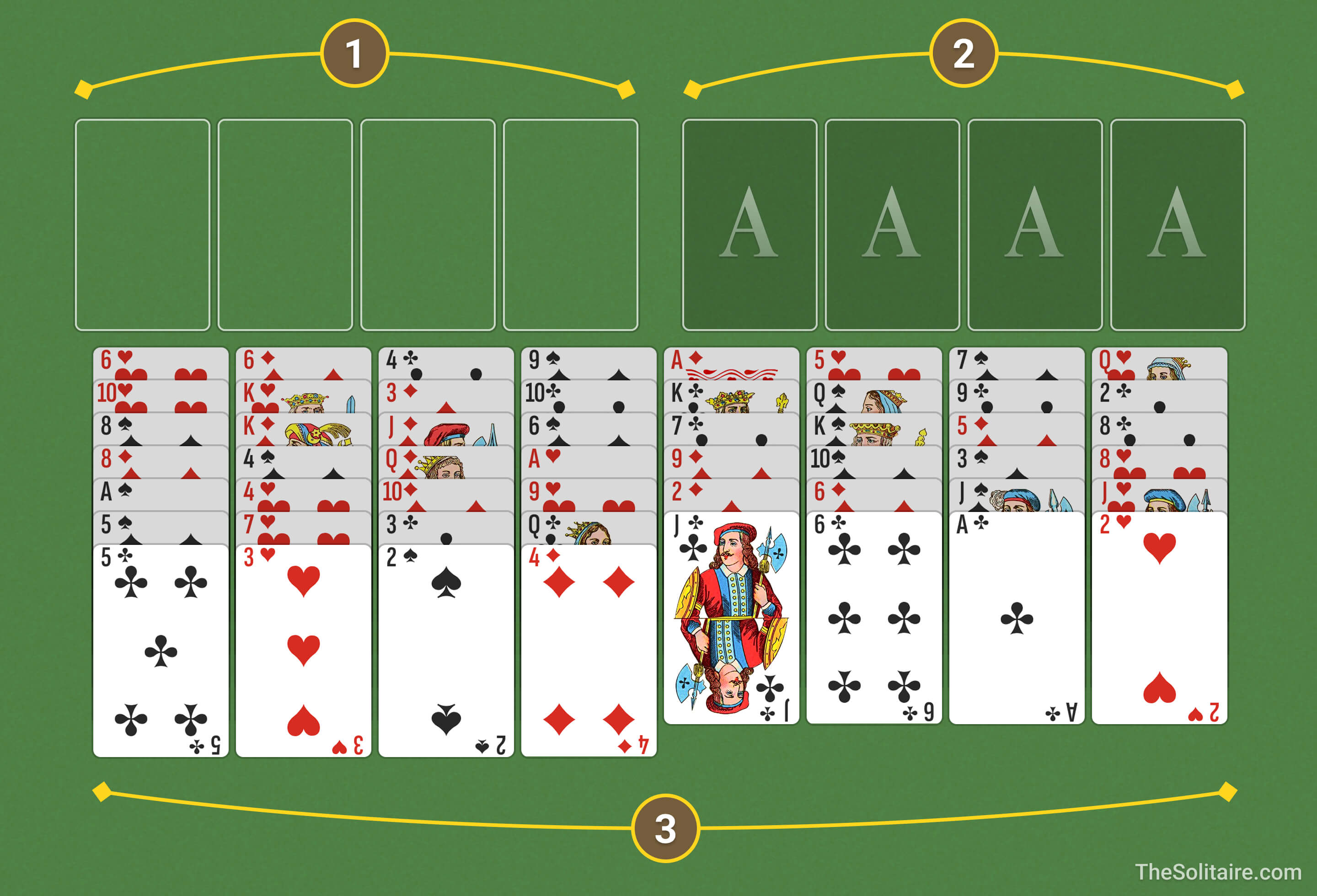
FreeCell uses 2 standard decks of 52 cards (104 cards total).
Types of Solitaire Piles
- Free Cells are the key feature of FreeCell Solitaire. There are 4 Free Cells, and you can temporarily hold one card in each cell.
- Goal: Build 4 foundation piles, one per suit, from A to K.
- Start each pile with an A, then add cards of the same suit in ascending order: 2, 3, …, K.
- All 52 cards are dealt face up at the start.
- There are 8 columns total: 4 columns have 7 cards, and 4 columns have 6 cards.
- Build down in descending order, alternating colors. For example: Q, J, 10.
How to Move Cards in Solitaire
- Cards can only be placed in descending order (J, 10, 9, etc.).
- Alternate colours. Example: J can be placed on Q or Q.
- In FreeCell, you move one card at a time. Fortunately, on this site you can drag a valid sequence, and the game will perform the required single-card moves automatically. The maximum sequence length you can move this way is the number of empty Free Cells + 1. Examples:
- 0 empty Free Cells — 1 card
- 1 empty Free Cell — 2 cards
- 2 empty Free Cells — 3 cards
- 3 empty Free Cells — 4 cards
- 4 empty Free Cells — 5 cards
- Exception: If you have an empty tableau column and at least one empty Free Cell, you can move a sequence that is twice as long as the normal limit. For example, with 2 empty Free Cells you can normally move 3 cards. With 1 empty column available as well, you can move 6. This works only when the empty column is used as temporary space. If you move the sequence into that empty column, the doubled limit does not apply.
- You can start an empty column with any card.
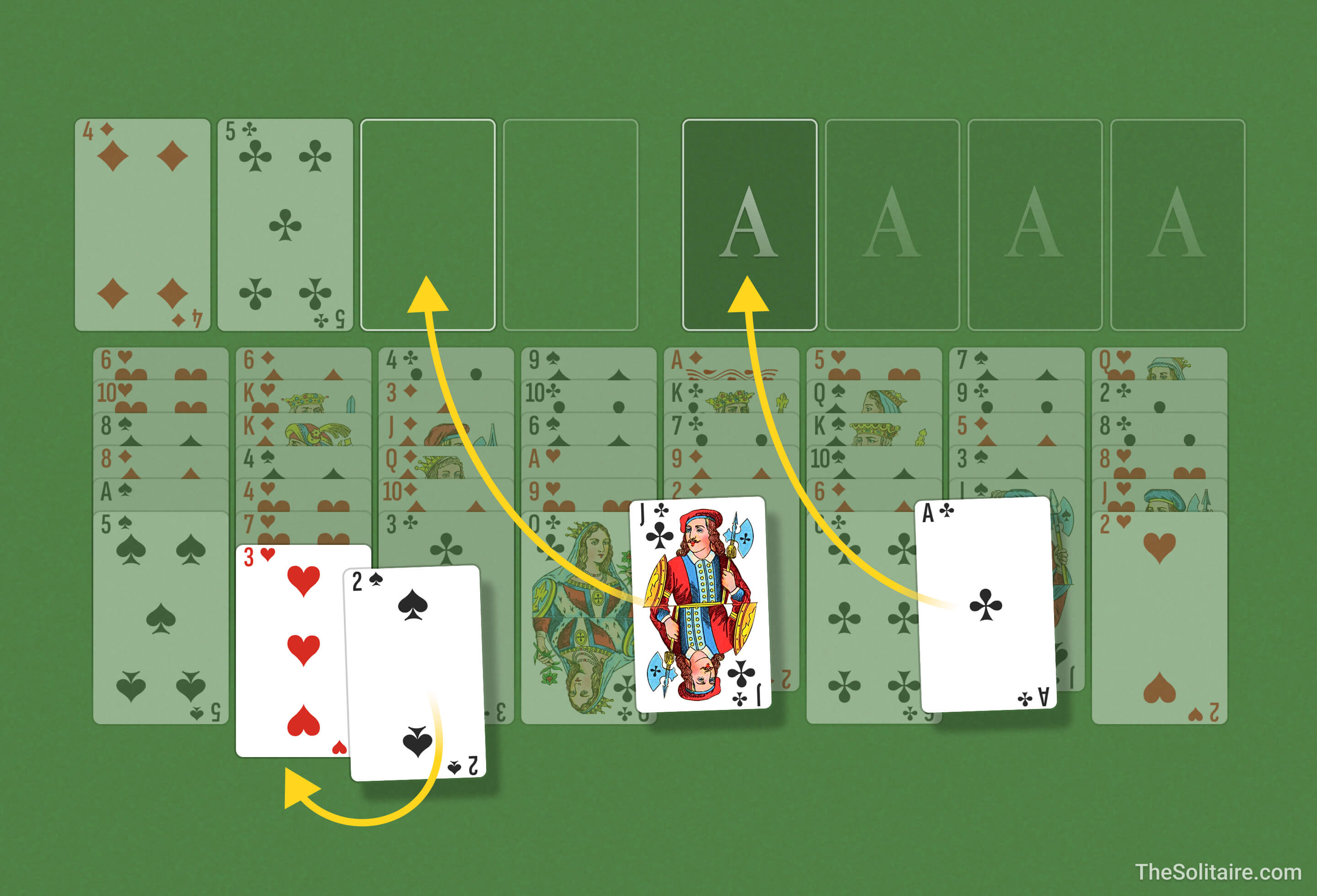
- Start with an A and build up in ascending order within the same suit. Example: A, 2, 3.
- Once a card is moved to a Foundation pile, it cannot be moved back.
Keyboard Shortcuts
 Navigate
 Take/Place Card
 Undo
Undo
 Use Deck
 Hint
Hint
 Pause Game

FreeCell Strategies — Tips & Tricks
A few insider secrets from seasoned Solitaire players to help you win more often.
- Use higher cards to start a new column. The higher the card you place on an empty space, the longer a sequence you can build. Starting with K is best.
- Aces and Twos. Find A and 2 and move them to the foundations as soon as possible. It’s a no-brainer move — these cards are useless in the tableau, so clear them out right away!
- Handy tools. Use
 and
and  when you’re stuck. Hint highlights moves you might have missed. Undo lets you reverse missteps with a single click.
 - Advance cards evenly. Building all four foundation piles at about the same pace helps you avoid blocking cards you still need to build sequences in the columns. Try to keep the foundations no more than three ranks apart. If the gap gets larger, you probably moved cards to the foundations too aggressively.
- Want to go deeper? Check out our complete FreeCell Solitaire guide.
More Puzzle-style Solitaire Games
Eight Off FreeCell: A close relative and early predecessor of FreeCell. It uses eight reserve cells, with four occupied at the start, which changes how quickly you can free up moves.
Baker’s Game: A FreeCell-style game where you build sequences by suit instead of alternating colors, so planning becomes stricter.
Black Hole: A Golf-style solitaire where you clear the table by moving cards to a single pile, one rank higher or lower than the top card.