



We’ve listened to your feedback and added a new setting to TheSolitaire.com that lets you control how the site feels while you play. Choose between Fast, Normal, and Slow — and the change applies instantly across all solitaire games on the site.
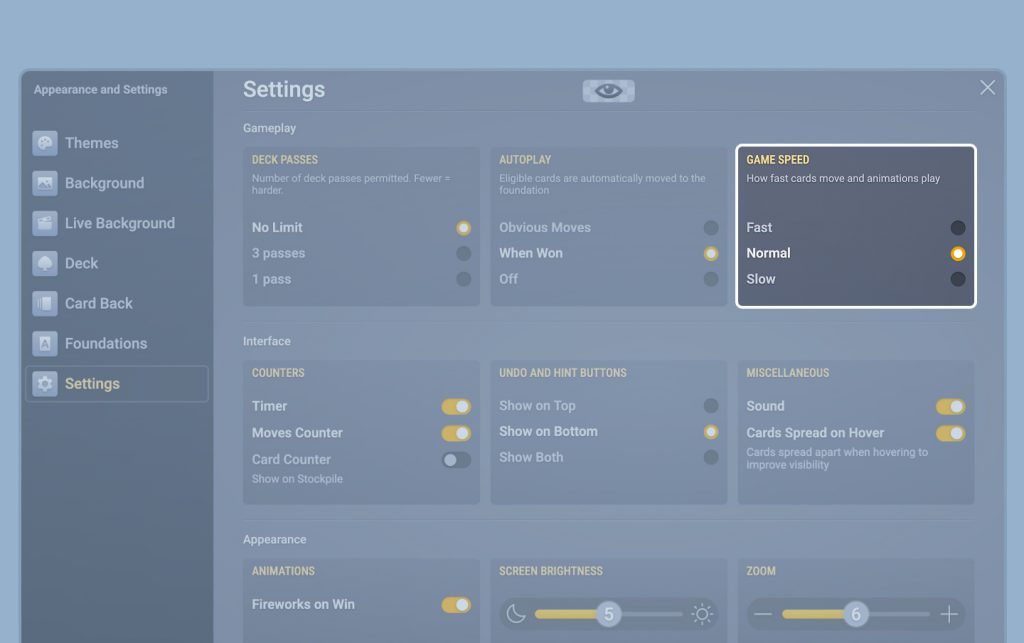
This setting is all about animation speed: how quickly cards move, deal, and slide into place. It does not change the rules, difficulty, or how much thinking time you have. In other words, Fast won’t demand quicker reactions — it simply reduces waiting between moves. Slow does the opposite: it keeps the same gameplay, but gives you a calmer, more readable pace.
To change the speed, click the gear button at the bottom of the screen to open Settings, then choose a speed: Fast, Normal, or Slow — at the top of the panel.
Why speed matters in online Solitaire
Solitaire is a game of decisions, not reflexes — but animation timing still affects comfort. Some players want a snappy flow so they can play more games with less downtime. Others prefer slower motion because it’s easier to track sequences, plan moves, and simply relax.
That’s why we kept the feature simple: three clear options instead of a complicated slider. Normal is the balanced default. Fast cuts the waiting between moves. Slow gives you a calmer pace that’s easier to follow.


